Project Yukon: Developing A Style
One thing that has been a constant iterative proccess has been determining the visual design of Project Yukon. Even now I am still tweaking and modifying the visual style to make something that’s unique while also looks good but I’ve made a bunch of progress since I started on this project.
For example, here is a super early version of what Project Yukon first looked like.

To me, the colors look very desaturated and bland, expecially compared to the trunks and leaves of the trees around them. And while winter isn’t exactly full of light and color, I didn’t want the world to feel too flat and lifeless.
You can see that I had decided early on that I wanted the visual design to be stylized and simple. Unreal Engine is great for making realistic games, especially when using Lumen, Nanite, and the Quixel Megascans that come with UE5.
However, since I’m working on this game on my own, any asset I couldn’t find a realistic model or texture for would have to be modeled and textured by myself. There’s also the fact that the realistic route would also mean that animations for Carter, Juniper, and everything else in the world would also have to be animated more realistically.
Long story short, a realistic style was off the table so I needed to figure out an art style to utilize.
“Creative Parameters”
One of my favorite lessons that I’ve learned in game development but also creativity in general: Seeing a “Limitation” instead as a “Creative Parameter”. I remember hearing about the implementation of the fog in Silent Hill and how it was added primarily due to the original PlayStation not being able to have that high of a render distance. The fog was able to not only hide the pop-in of assets but also added to the unsettling atmosphere of the game. For example, now players would hear monsters before they would become visible through the fog, giving them a few moments of fear and unease as they tried to figure out where the creature would be coming from.
I’ve also used this outside of game development when writing music. Sometimes I will give myself artificial limitations to help break out of whatever creative block I’m in or write something in a way I normally wouldn’t. In making the soundtrack for the game jam project Meme Messenger, I made sure to fit ringtones samples into each of the tracks in order for them to better fit with the smartphone/texting nature of the game. The samples ended up making each of the songs sound unique and were incredible inspiration in making the tracks for the game.
Inspirations
Comics and manga were and still are the main sources of inspiration for Yukon’s visual style. I really like the vibrant colors with relatively simply shading, as well as the creative means that shadows can be conveyed.
It also fit my needs and matched the tone of the game.
- Relatively easy to model and texture, given my beginner experience.
- Fits the generally pulp-y adventure stories that inspired the game.
- It’s a unique design that stands out in a crowd.
I also came across the work of Caspar David Friedrich, a 19th-century German that made a lot of paintings depicting humans in expansive landscapes. A few of his paintings fit the feeling that I wanted Project Yukon to have, at least occasionally. This is a black and white photograph of “Monk in the Snow” from 1808, the original painting having been destroyed in a fire. The original work might have had more color to it, but I liked how desolate it made the location feel.

If you’ve played Minecraft, you might also recognize another painting of his, “Wanderer above the Sea of Fog”. It’s one of the paintings you can place in the game, which I thought was a cool discovery.
Iterative Implimentation
Oh boy, if I were to go through all the iterations of the post process shader we could be here all day. And I’ve already kept you here a while so I’ll try and be quick.
Cel-Shading
Cel-shading was the first thing I worked on, going through at least three different methods before settling on the one I am currently using (I really want to go back in and tweak it still so maybe we’ll get to four, who knows).
After the shading was implemented, I experimented with having a different number of color bands. Here’s an image from May 2023 showing some of these changes and experiments. In Version 1, there were only 2 bands, meaning there was a “lit” color and an “unlit” color. Version 2 instead has two in-between colors for edges of the light. So instead of just a “lit” and “unlit” color, there are also “partially lit” and “mostly lit” colors.
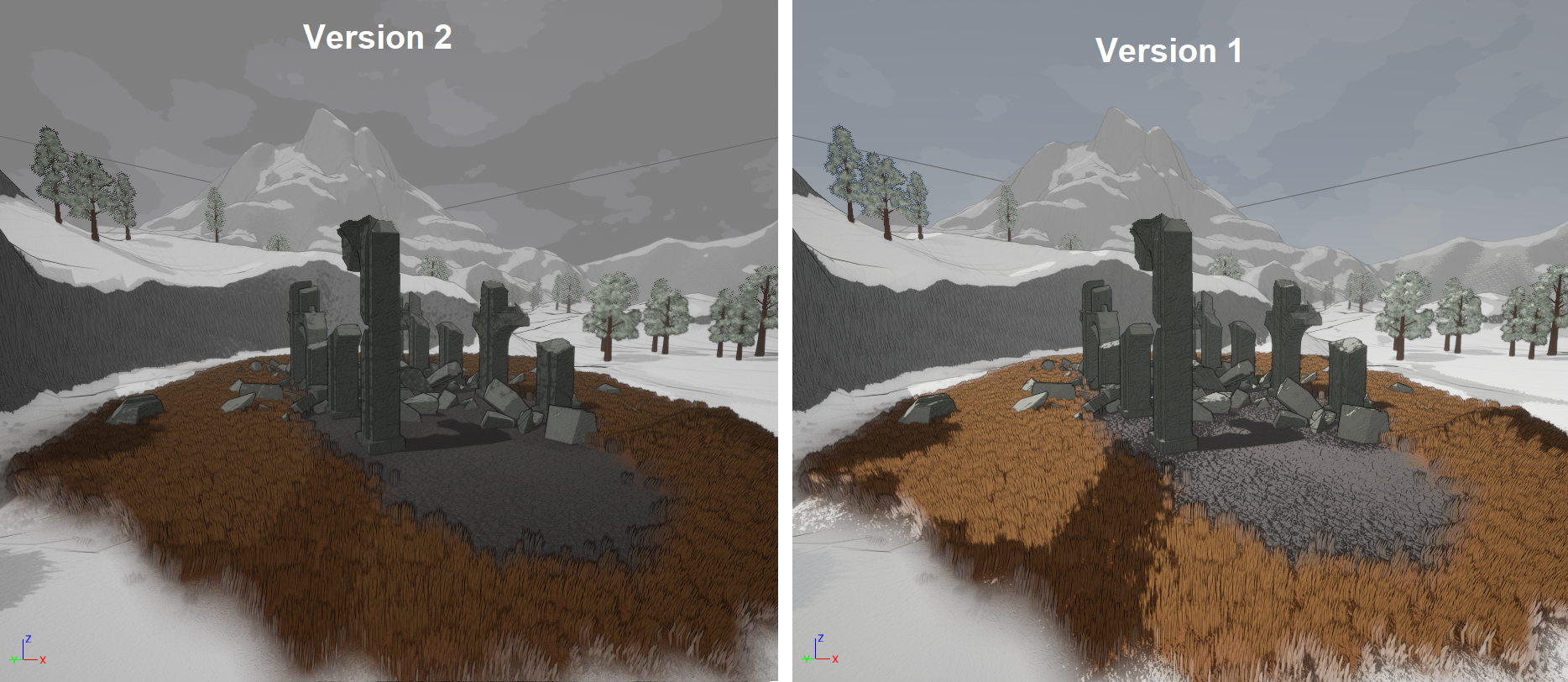
The resulting image was a lot darker than I liked but it did make the normal maps stand out less, which you can see in the road.
Outlines
Outlines were something I wanted to add in order to break up the… well, outlines… of the objects in the world. This isn’t too difficult to do in Unreal and game engines, but I wanted to make sure that outlines could also be applied to the normal textures of an object to add more variety and make the normal maps stand out more. Here’s a comparison between two versions of the outline implementation.

You can probably see how Version 2 stone walls and rock look way too grainy and detailed, although the grass surrounding the ruins is more clear in how it’s seperated and the overall outlines on everything are more subtle. You can also tell that in both versions the outlines of the trees looks really notiable and add a lot of black to their design. This is something that was fixed later on with using a new tree model, which was useful to learn. A post processing shader can be implimented and coded perfectly but a bad model can make it look muddy and off.
Crosshatching
Crosshatching was something I expected to be a lot harder than it actually was. In a lot of ways, it’s basically a slightly different kind of cel-shading, just adding an additional texture instead of changing the color depending on the light.
Here’s the first implementation of it in September of 2023.
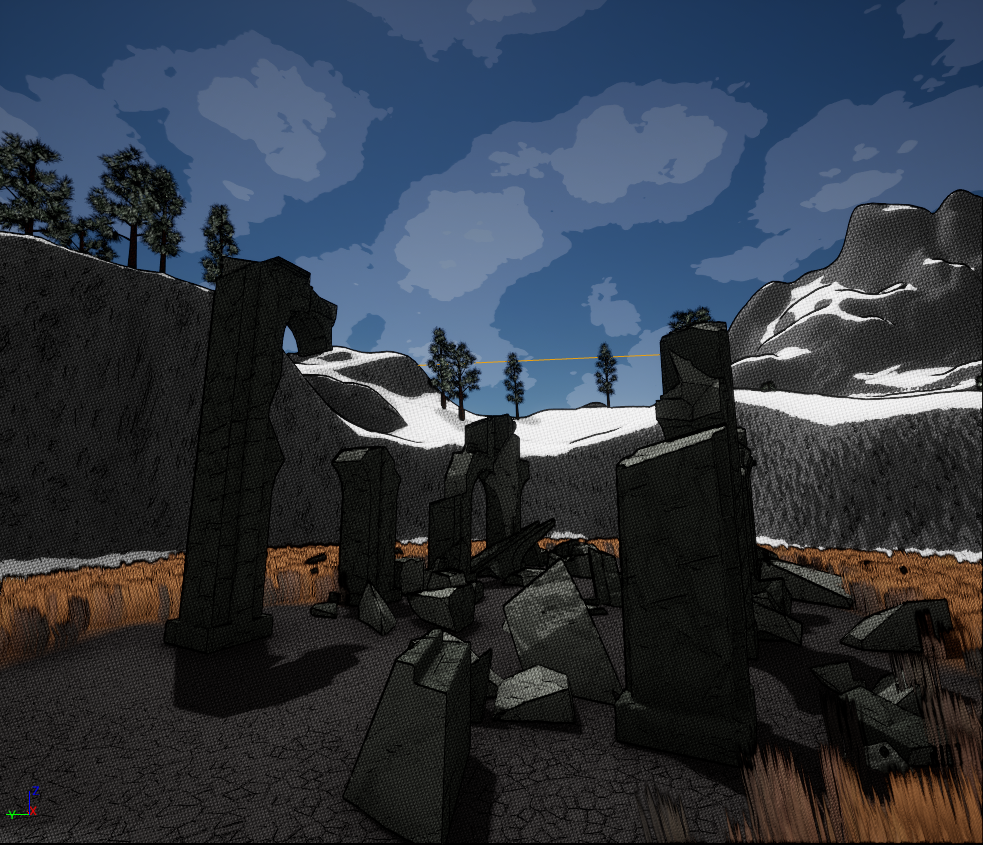
I initially loved how subtle it looked but it came to be a bit of an issue later on. The hatching is on a pixel level in this image, which meant that there would be a lot of ghosting whenever the player passed over them with their outline. Currently, I’ve removed the hatching entirely but I still want to try and figure out a way to make it work without muddying the image.
Conclusion
Alright, so this is roughly where the game currently stands in terms of its visual style. The cel-shading is limited to only 2 bands (although there seems to be some weird errors with this I need to work on), outlines are subtle but still present, and the overall color scheme is bright and vibrant, although the tall grass should probably look less like a wheat field and more dead.

You may also notice that the trees in the back have no outline. This is to prevent the outline standing out to the point of overwhelming the tree silhouette as the camera moves away from it. I think it stands out a little too much here but I’ll work on it.